
Set Up Your Health Insurance!
IMPORTANT: All exchange visitors sponsored by IENA receive up to 123 days of health insurance through their program. Each applicant is responsible to extend their health insurance to cover the full duration of their stay in the US. This step is very important- healthcare in the US is very expensive, so take steps now to make sure you are covered!
All exchange visitors must be covered by the IENA medical insurance for the entire duration of your stay in the US.
STEP 1: CONFIRM YOUR INSURANCE DATES!
Instructions
You will need your flight information to complete this step.
- Log-in to your IENA profile (click Here)
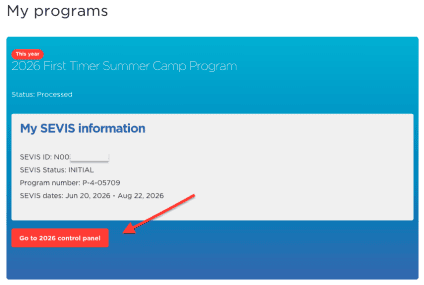
- Click on the “GO TO 2026 CONTROL PANEL” button.
- You can now access your insurance in two spots:
- On the left hand side of your dashboard under the “Insurance” section
- Scroll to the bottom of your dashboard, to the section titled “Other items needed to be completed.” Click the “Insurance” icon

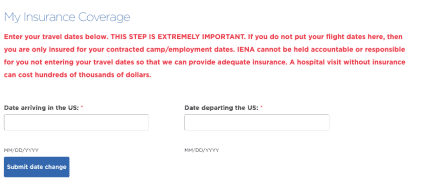
- Enter the dates you are ARRIVING to the US and DEPARTING the US. These should match your US arrival and departure flights. This will update your health insurance dates to cover your entire stay in the US (including travel period).
- If you do not input your flight dates here, you will only be insured for your contract/ DS 2019 Form dates!
- All exchange visitors must be covered by the IENA medical insurance for the entire duration of your stay in the US. This is a Department of State requirement for the BridgeUSA program.
STEP 2. DOWNLOAD YOUR INSURANCE CARD
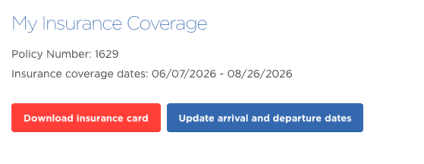
- Download your insurance card! Once you have entered your US arrival & departure dates above, you will be able to download your insurance card via the “Insurance” tab on your IENA dashboard. You can also change your insurance dates here, if your travel itinerary changes.
- This is the only access to change your insurance dates, if needed!
- Digitally add your insurance card to your Apple Wallet or Android Wallet!